
Look Around Mode
Stand inside a scanned room and walk through it, instead of circling it from outside.
Overview
In Orbit, the default camera mode, the camera circles your models from outside. That works for an object. It works badly for a space you are meant to stand in, such as a scanned room or a building interior.
In Look around mode the camera stays where it stands and turns in place, the way you turn your head. You walk through the scene with the keyboard or the mouse wheel.
The project owner picks the mode for each project. Visitors can't switch it. If a project opens in Orbit, the controls in Camera navigation apply instead.
Turn on Look around
You need to own the project and have a Corporate plan.
- Open the project in the web viewer.
- In the left panel, open the Project Info tab.
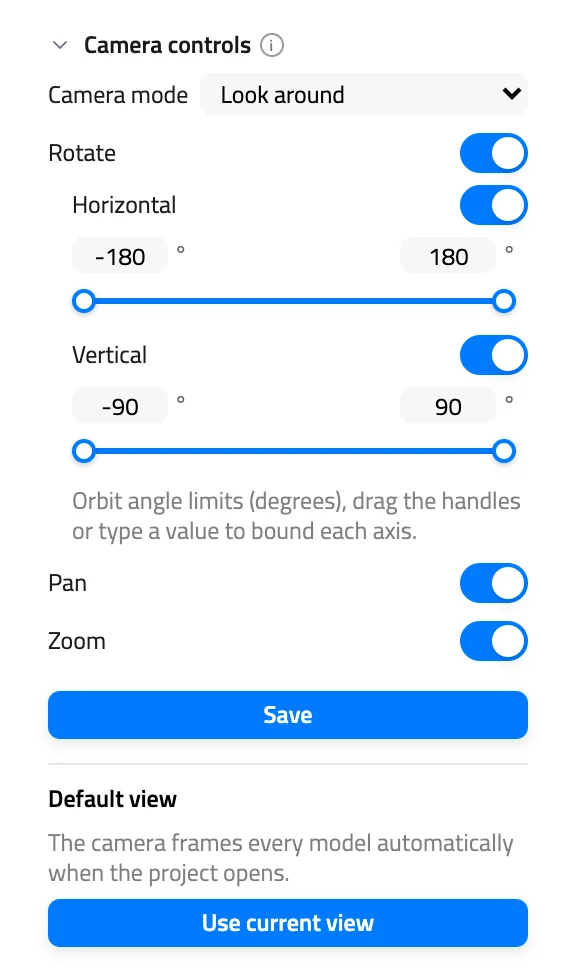
- Expand the Camera controls section.
- Set Camera mode to Look around.
- Click Save.
When a project opens, the viewer frames the models from outside them. In a scanned room that means you start behind a wall. Walk inside, then save that spot as the project's default view so everyone starts there. See Camera controls and default view.
Mouse and keyboard
| Action | What it does |
|---|---|
| Drag with the left button | Turns the view in place |
| Drag with the right button | Slides the camera sideways and up or down |
| Scroll the mouse wheel | Walks forward or back, staying level |
| Hold W or S | Walks forward or back in the direction the camera points |
| Hold A or D | Steps left or right |
The mouse wheel keeps you at the same height. W and S move you where the camera points, so if you look up and hold W, you rise. Hold two keys, such as W and D, to walk diagonally.
The arrow keys don't move the camera. Walls don't stop the camera. It walks through them.
Touch screens
| Gesture | What it does |
|---|---|
| Drag with one finger | Turns the view in place |
| Drag with two fingers | Slides the camera sideways and up or down |
Pinching does nothing in Look around mode, and there is no touch gesture for walking forward or back.
Face a model
Double-click a model in the Scene tab of the left panel. In Orbit the camera flies to the model. In Look around it stays where it is and turns to face the model.
Reset the view
Reset view works as in Orbit. It brings the camera back to where it stood when the project opened, facing the same way. The button sits below the Transform toolbar on the right edge and appears only when you are signed in and have moved the camera. See Camera navigation.
What the owner controls
The project owner's other camera controls still apply in Look around mode. If dragging doesn't turn the view, the owner has turned off Rotate. If right-drag doesn't slide the camera, the owner has turned off Pan. The Horizontal and Vertical angle limits set how far you can turn.
Next Steps
- Pick the camera mode and save a starting point in Camera controls and default view.
- Go back to the Orbit controls in Camera navigation.
- See every shortcut in the keyboard shortcuts reference.
Still have questions?
If you still have questions, please reach out to our support team for assistance.
Contact Support